Keyword tracking
Catch rank changes before they cost you downloads
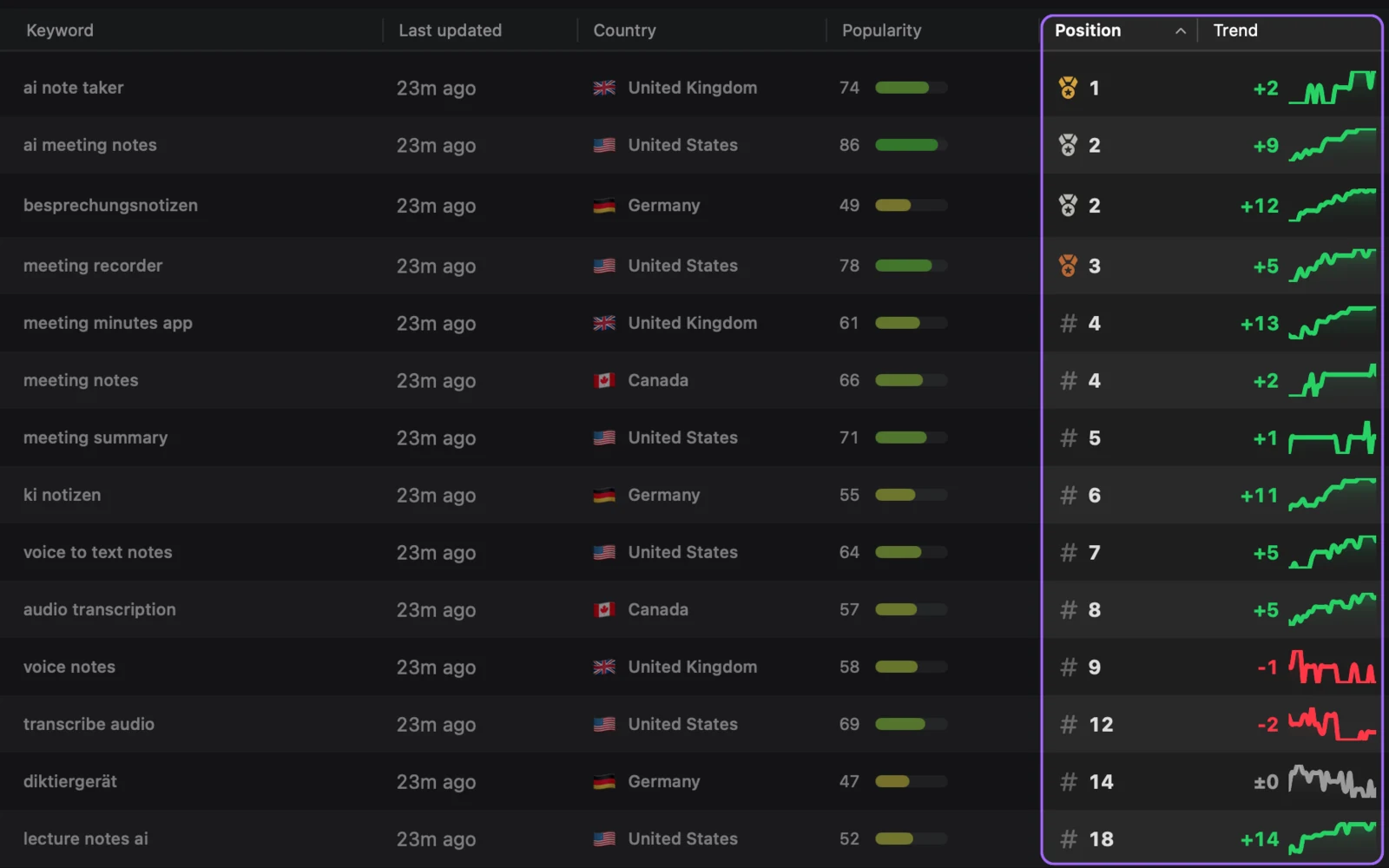
Turn on daily refresh and OpenASO checks your keywords in every storefront you care about. You see what moved and when, with no weekly spreadsheet to rebuild.
 OpenASO
Free and open source
OpenASO tracks your rankings, competitors, and reviews. Connect your AI assistant and it turns all of it into a keyword plan you can act on today.
Requires macOS 15 or later. Keyword popularity uses your Apple Ads account.
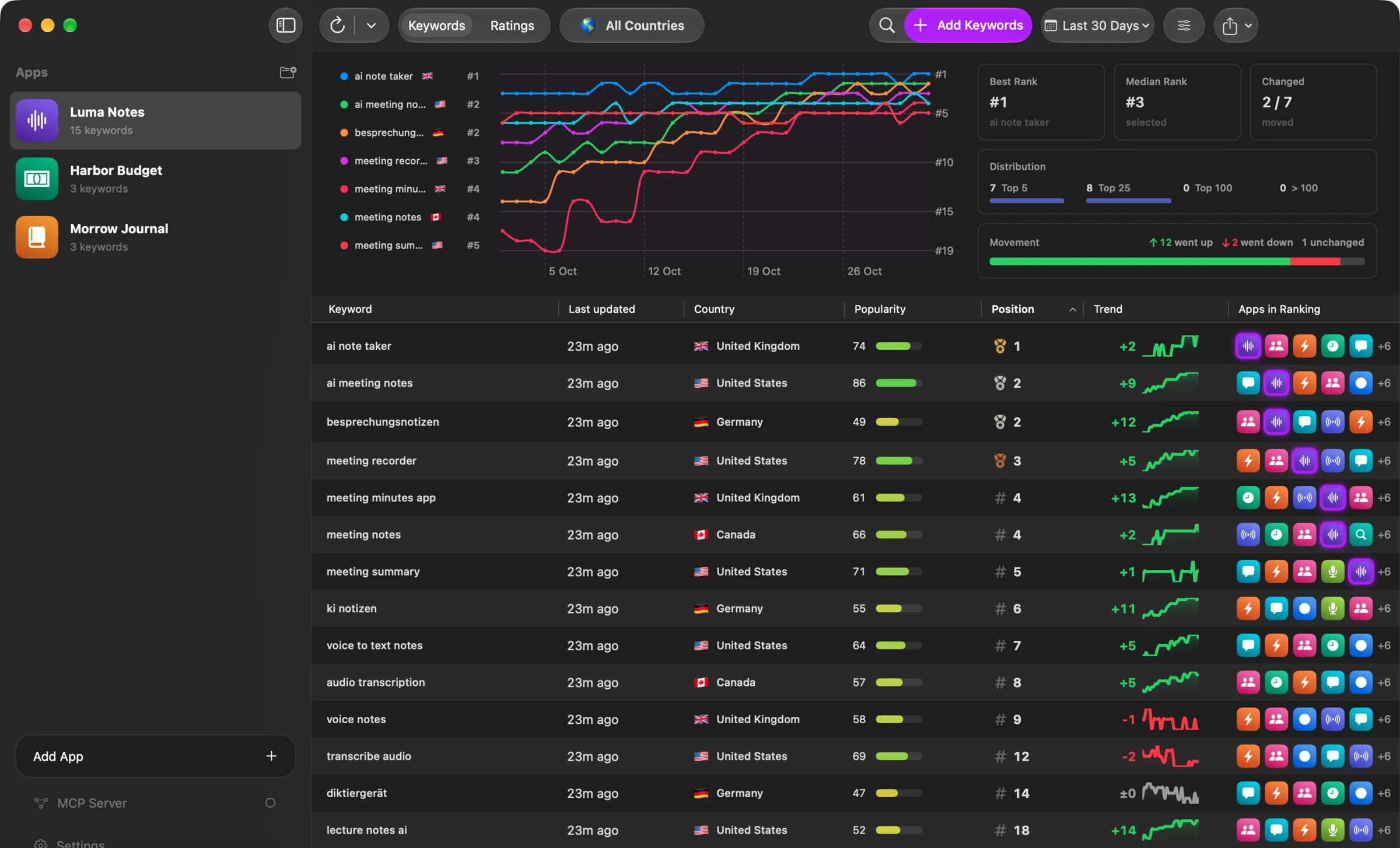
Ask a chatbot for keywords and it guesses. Connect OpenASO and it does the research first: your listing, your live rankings, your competitors, and what people actually search for.
The same connection can rewrite your title and subtitle, compare competitor screenshots, pick the countries worth localizing for, or turn reviews into your next release plan.
Stop juggling App Store searches and fragile spreadsheets. See your keywords, rankings, competitors, ratings, and reviews in one place, for your own app or any app you want to learn from.
Keyword tracking
Turn on daily refresh and OpenASO checks your keywords in every storefront you care about. You see what moved and when, with no weekly spreadsheet to rebuild.
Competitor research
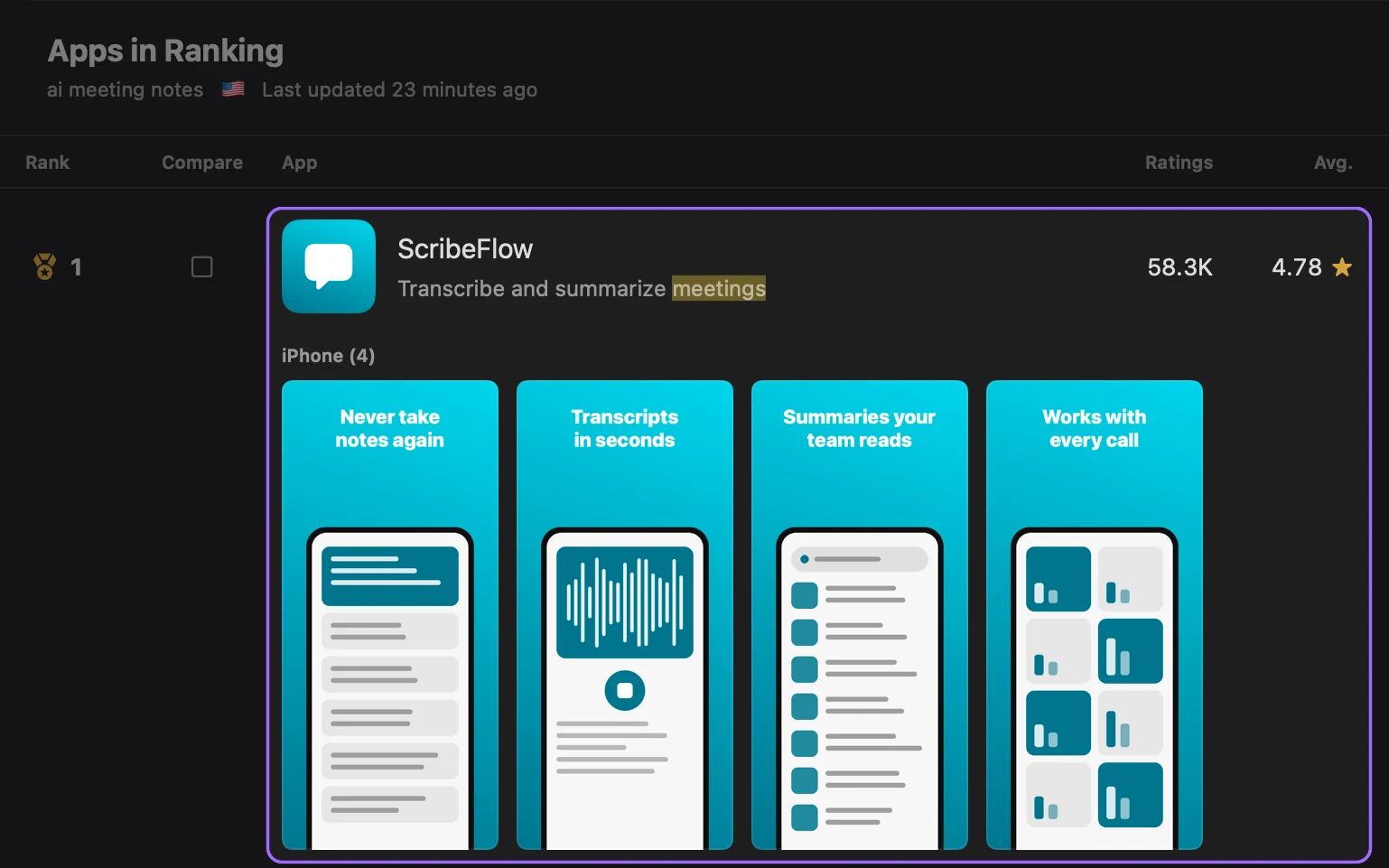
Open any keyword to see who ranks for it, how fast they are gaining ratings, and the screenshots they use to win the download.
Keyword research
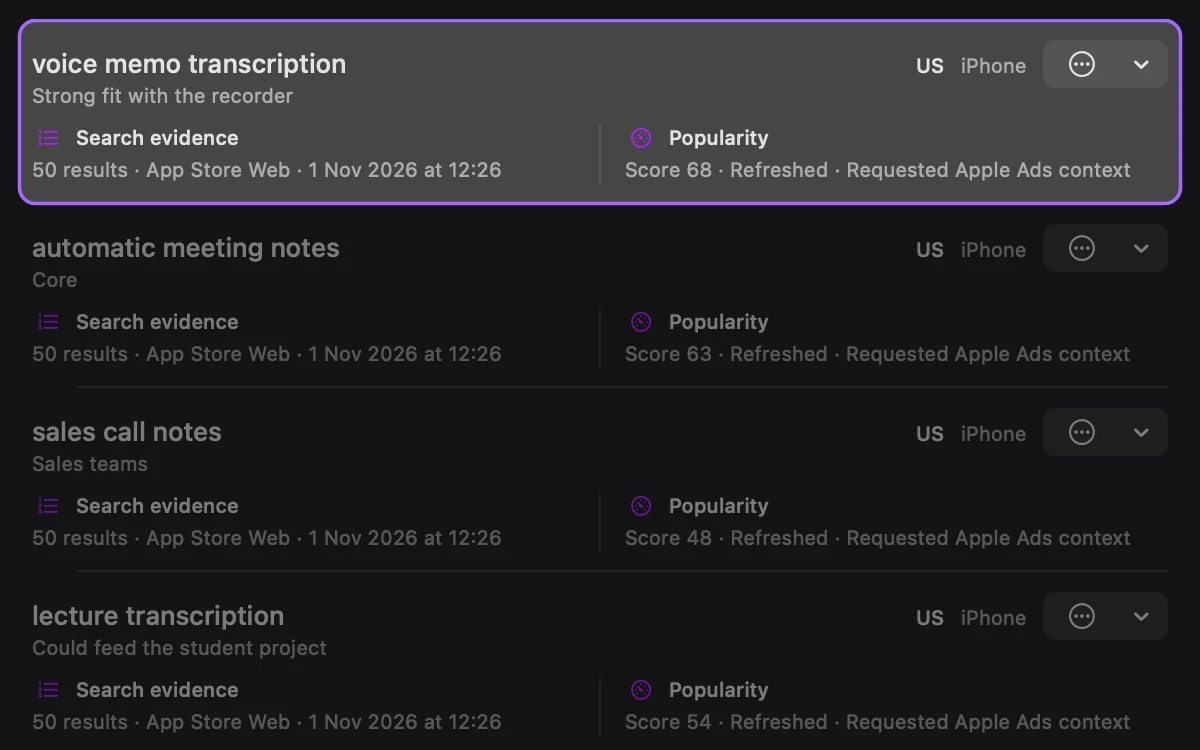
Collect ideas in a project, check real search results and popularity for each one, and move the winners into tracking. It works before your app is even live. Popularity scores come from your Apple Ads account.
Ratings and reviews
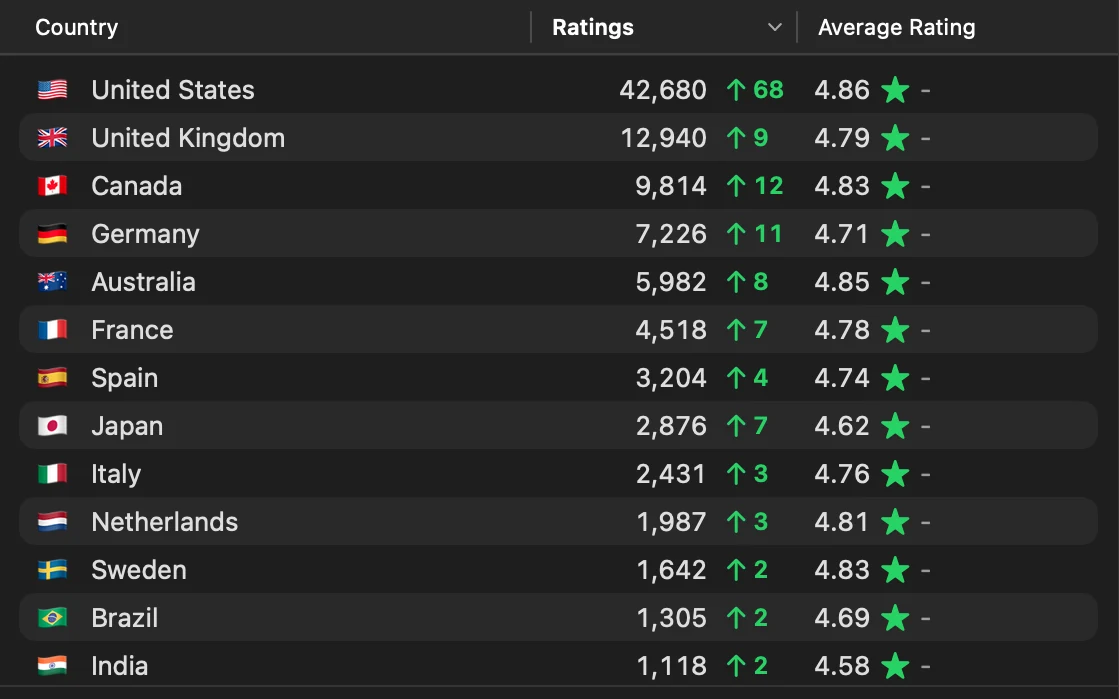
Compare ratings across storefronts, then filter reviews by date and stars to find the praise, complaints, and requests that keep coming up.
Review replies
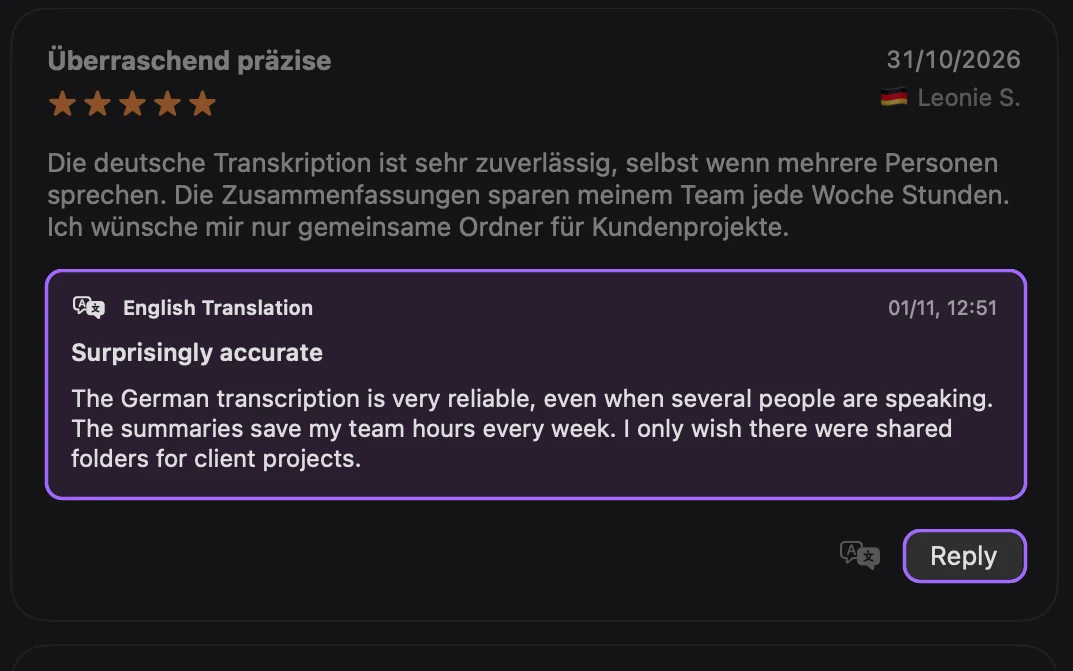
Translate reviews into English on your Mac, right below the original. Connect App Store Connect and you can answer them from the same screen.
Your keyword list is competitive intel. OpenASO stores it on your Mac, goes straight to the App Store for data, and shares it with an AI assistant only when you connect one.
OpenASOStart with one app. OpenASO builds the history, and your assistant does the digging.
Search the App Store or paste an ID. Add competitors the same way.
Copy one block of settings into Claude, Codex, VS Code, or Antigravity.
It checks your listing, rankings, and rivals, then adds the best keywords to tracking.
Follow every keyword by storefront, and ask again whenever the data changes.
OpenASO includes an MCP server, the standard way for AI tools to use data from other apps. Connect Claude, Codex, VS Code, or Antigravity and your assistant can read your listing, rankings, competitors, reviews, and popularity scores, then add keywords for you. Other MCP clients may work too.
OpenASO does not include an AI model or charge for one. You use the AI client you already have, under that client's own plan. Everything else in OpenASO works without AI.
Yes. OpenASO is free and MIT licensed. You can inspect the source on GitHub and use the app without a subscription.
A Mac running macOS 15 or later. You can track rankings, competitors, ratings, and public reviews without connecting any other account. Replying to reviews needs App Store Connect access to your app.
Only for keyword popularity scores. Your Apple Ads account must be fully set up, including payment or tax information. Fetching popularity is free, and OpenASO never creates campaigns or charges your card.
Your OpenASO workspace is stored locally on your Mac. Apps, keywords, rankings, ratings, reviews, and research history stay in the local app unless you choose to export or share them.
Yes. Add your own app, a competitor, or any public App Store app by search or App Store ID.
Track keyword positions by app, storefront, and platform. Each snapshot records the position and nearby ranked apps so you can compare movement and competitive context over time.
Add an app and a handful of keywords to see current positions, the competitors appearing around them, storefront ratings, and recent customer feedback. That first pass gives you a grounded shortlist of what to investigate next.
Yes. Filter reviews by country and rating, and translate them into English where Apple's on-device translation is available. If you connect App Store Connect, you can also reply to reviews of your own apps from OpenASO.
Download OpenASO, add your app, and ask your assistant for a plan. It's free, and your data stays on your Mac.